
Importing wrestlers and teams from a spreadsheet is a fast way to build a predefined tournament. Before importing, make sure your spreadsheet follows the required format and that the information matches your tournament setup. Follow the steps below to import your wrestlers and teams, or watch the video below for a complete walkthrough.
Import Teams
Prepare Your Spreadsheet
Your spreadsheet must include:
- One team per row
- One team name column
- One team abbreviation column
- One state abbreviation column
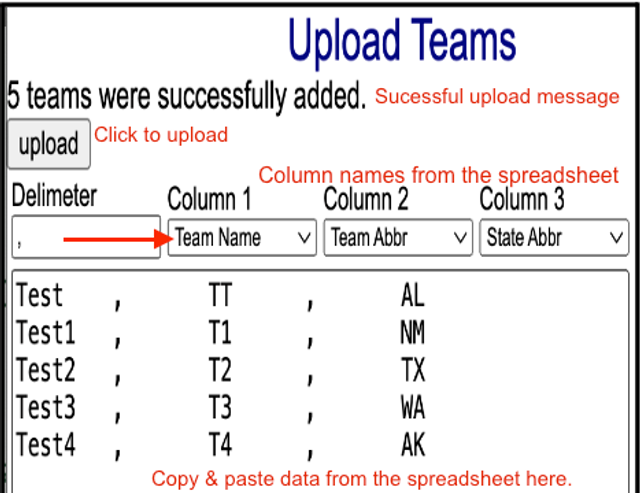
- A delimiter column containing a comma (,) between each field
Upload Teams
- Log in to your tournament as an administrator.
- Go to Left Menu > Teams > Upload Teams.
- Use the drop-down menus to match each spreadsheet column to the appropriate field.
- Copy the spreadsheet data without the column headers.
- Paste the data into the upload text box.
- Click Upload.
- Go to Left Menu > Teams to verify the imported teams.
Import Wrestlers
Prepare Your Spreadsheet
Your spreadsheet must:
- Include one wrestler per row.
- Include one field per column.
- Use division, weight class, and team names that exactly match those in your tournament.
Upload Wrestlers
- Insert an extra column between each data column.
- Fill each extra column with commas (,).
- Copy the spreadsheet data without the column headers.
- Go to Registration > Upload > Wrestlers in Delimited Format.
- Paste the data into the upload text box.
- Match each spreadsheet column using the drop-down menus.
- Click Upload.
- Go to Registration > Wrestlers to verify the imported wrestlers.
Related Resources
Need to import wrestlers into a different tournament format? See Import a Spreadsheet of Wrestlers into an Open Tournament & Import a Spreadsheet of Wrestlers into a Dual Team Tournament.